

This article explores the core value of DM codes in the laser marking industry: through CKVision SDK’s machine vision recognition algorithms and image preprocessing technology, it effectively resolves reading challenges such as metal reflections; implements quality grading based on ISO standards to monitor and optimize laser processes in real-time; and combines “on-the-fly” capture with coordinate calibration technology to significantly enhance production line capacity and alignment accuracy while ensuring full lifecycle traceability.
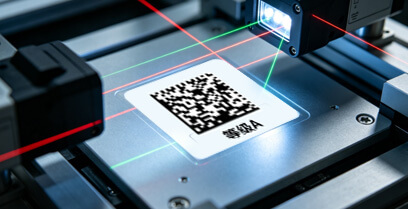
I. DM Code Reading: The First “Quality Gate” After Marking
-
High-Performance Recognition Algorithms
Utilizing the CKDataMatrix module in CKReader.dll, the system can rapidly locate and decode DM codes produced by laser marking. In complex backgrounds, the CKFindBarcode module significantly reduces full-image search time and improves reading efficiency.
-
Necessity of Image Preprocessing
Laser marking on metal surfaces may create heat-affected zones, reducing code area contrast. Using the ImgLocalThreshold (local adaptive binarization) algorithm provided by CKBase.dll effectively addresses uneven illumination and metal reflection issues. Additionally, ImgMedian (median filtering) removes fine noise generated by laser ablation, ensuring sharp barcode edges.
-
Real-Time Clarity Assessment
Before high-speed reading, calling CSharpAssess::GetClarity() to evaluate image clarity is crucial. If mechanical vibration causes image blur, the system can provide early warnings to avoid outputting incorrect recognition results.
II. Quality Grading: The “Health Report” for Laser Processes
-
ISO Standard Mapping
Quality grading typically follows ISO/IEC 15415 (for labels) and ISO/IEC 29158 (for DPM codes) standards. The system-returned qualGrade integer value (0-4) directly corresponds to quality ratings from F to A.
-
Optimizing Laser Parameters
By monitoring iso29158 grades, process engineers can determine whether laser energy is too strong (causing ablation diffusion) or too weak (resulting in insufficient contrast). If the grade drops from A to C, the system can automatically prompt adjustments to laser frequency or power.
-
Multi-Metric Analysis
Data provided in DMResult such as numCellX/Y (matrix rows/columns) and codeWidth/Height (code dimensions) can be used to monitor whether the laser marking machine’s galvanometer exhibits geometric distortion.
III. Application Importance in the Laser Marking Industry
-
Ensuring Uninterrupted Full Traceability Chain
In industries like automotive and semiconductor, products undergo chemical cleaning, high-temperature baking, and other processes. Only when initial marking achieves high grades (such as A or B) can DM codes remain readable in harsh environments.
-
Implementing “On-the-Fly” Reading to Boost Production Capacity
Combined with I/O card hardware position comparison functionality, cameras can be triggered during high-speed movement of the marking head. This deep integration of vision and motion allows quality grading to be completed synchronously without stopping the production line, greatly enhancing UPH (units per hour).
-
Coordinate Transformation and Precision Alignment
For irregularly shaped parts requiring marking, positioning must precede marking. Using CPointCalib for coordinate calibration accurately maps visually detected positions to the laser galvanometer’s coordinate system, minimizing marking position deviation.
IV. Technical Implementation Logic
- Acquisition: I/O card issues position comparison signal, triggering the camera.
- Assessment: Calls CSharpAssess to determine image quality.
- Recognition and Grading: Uses CKDataMatrix for decoding and obtains qualGrade data from the DMResult structure.
Code Implementation Example
Implementation Code Sample
#include "CKBase.h"    // Basic image and geometry definitions
#include "CKReader.h"  // Includes CKDataMatrix.h reader module
#include <iostream>

using namespace CKVision;

void ReadDMCodeWithQuality(const wchar_t* imagePath) {
    // 1. Initialize CKVision library
    if (!InitLibrary()) {
        return;
    }

    // 2. Load image
    CPrImage grayImage;
    if (!grayImage.LoadBmp(imagePath)) {
        std::cout << "Failed to load image" << std::endl;
        ExitLibrary();
        return;
    }

    // 3. Instantiate DM reader (class name per SDK convention)
    CDataMatrix reader;

    // 4. Define result structure (reference DMResult definition from conversation history)
    // This structure contains codeText, qualGrade, iso15415 grade, iso29158 grade, etc.
    DMResult result;

    // 5. Execute recognition
    // Use MaxROI to represent full-image search
    if (reader.Execute(grayImage, MaxROI)) {
        // Get recognition results to populate structure
        reader.GetResult(&result);

        // 6. Output results and grades
        std::cout << "Content: " << result.codeText << std::endl;
        std::cout << "Overall Quality Grade: " << result.qualGrade << std::endl;
        std::cout << "ISO15415 Grade (Print): " << (int)result.iso15415Grade << std::endl;
        std::cout << "ISO29158 Grade (DPM): " << (int)result.iso29158Grade << std::endl;

        // 7. Get position information (bounding quadrilateral coordinates)
        for (int i = 0; i < 4; ++i) {
            std::cout << "Vertex " << i << ": (" << result.border[i].x
                      << ", " << result.border[i].y << ")" << std::endl;
        }
    } else {
        std::cout << "No DM code detected" << std::endl;
    }

    // 8. Release resources and exit
    grayImage.Release();
    ExitLibrary();
}
Core Parameters and Grading Insights
-
Grade Mapping
qualGrade, iso15415Grade, and iso29158Grade return integers between 0 and 4. In industrial standards, 4 represents the highest grade A, while 0 represents failing grade F.
-
DPM-Specific Standards
For the laser marking industry, iso29158Grade should be prioritized. This standard is specifically optimized for metal reflections and contrast issues in Direct Part Marking (DPM).
-
Position Data Type
The border field in the structure uses DPNT type. This double-precision floating-point structure provides sub-pixel level precision beyond pixel-level positioning, crucial for subsequent robotic grasping or secondary marking alignment tasks.
-
Pre-Recognition Image Quality Check
Before formal code reading, CSharpAssess::GetClarity() can first obtain image clarity scores. If the image itself is too blurry, the parsed grade may not reflect true marking quality.
-
Coordinate Transformation
To convert DM code pixel positions (border) to physical coordinates, use the Restore function of the CPointCalib class.
Preprocessing Recommendations (for Low-Grade Codes)
- Use ImgLocalThreshold to enhance local contrast.
- Use ImgMedian (median filtering) to eliminate particle noise on marking surfaces.